Only accept bookings inside the areas you serve.
ZipScheduler is online booking and scheduling software for local service businesses — cleaners, plumbers, mobile groomers, and more. Customers enter their ZIP code or postcode first. If you serve their area, they can choose a service and time. If not, ZipScheduler stops the booking before it costs you time.
Who it is for
Built for every trade that travels to the customer.
Product tour
See every part of it working.
Ten things you will actually do in ZipScheduler, recorded from the real product.
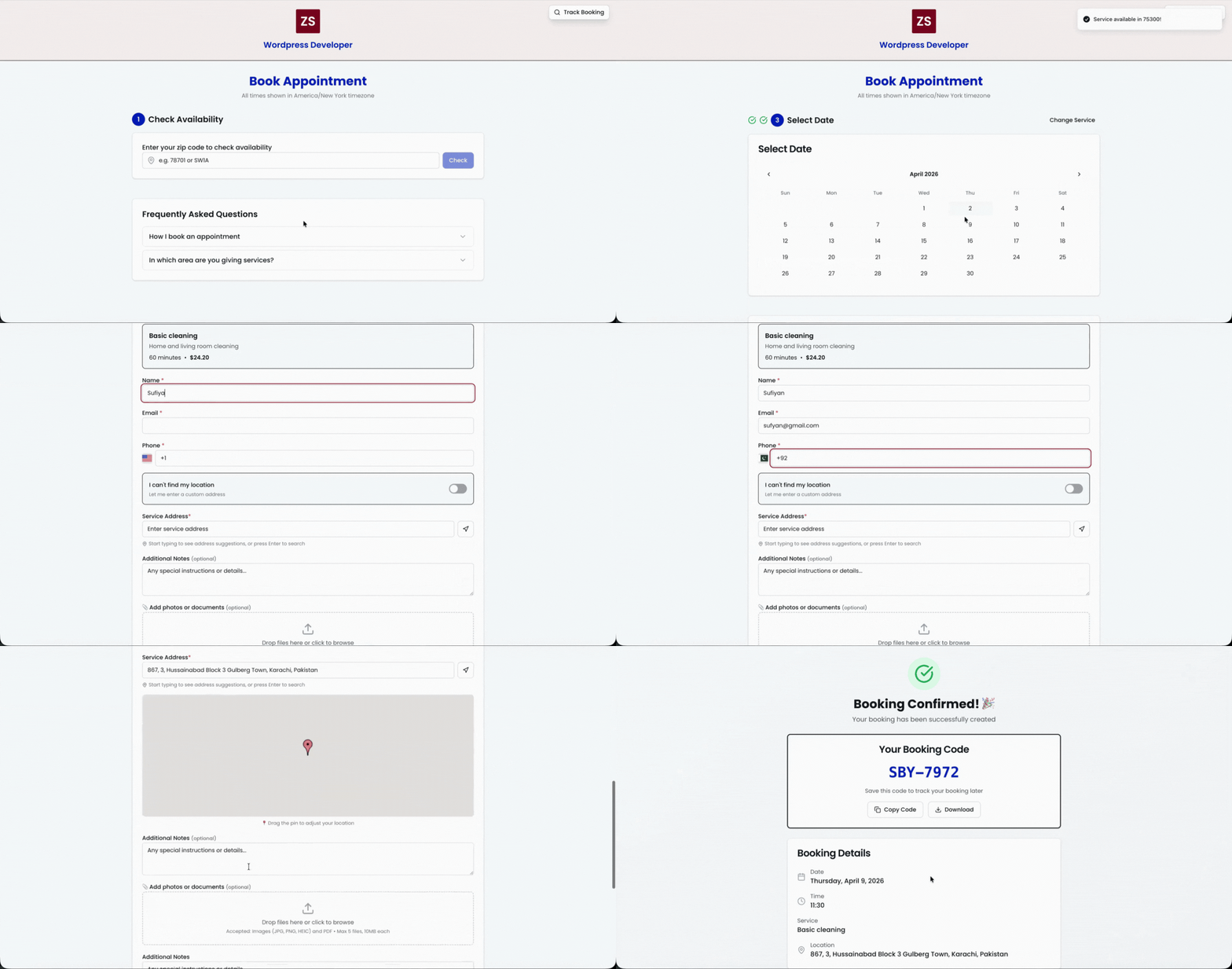
The area check happens before anything else
Customers enter their ZIP code or postcode first. Serve that area and they continue to services and times; if not, the booking stops there instead of costing you a call.
Booking flow
Works with what you already have
One booking link, everywhere your customers find you.
ZipScheduler gives you a hosted booking page and an embeddable link. Drop it into any website builder or CMS, or point a profile button straight at it — no plugin to install and no developer needed.
Websites and CMS platforms
Add the link to a button, menu item or embed block — the booking page carries your branding either way.
Profiles and social
Put the same link behind the booking button on your Google Business Profile or in any bio, so customers book from wherever they found you.
Not sure how to add it to your site?
Send us your website and we will tell you exactly where the booking link goes — or set it up with you.
Ask us to helpBuilt for the operational side of booking
Everything after the area check is already handled.
One place to control availability, receive jobs, manage your team, and keep customers informed.
Service area gate
Check ZIP codes and postcodes before the customer can book.
Availability by area
Set working days, hours, booking buffers, and capacity for every service area.
Services with the right details
Collect service type, customer notes, address details, and custom answers up front.
Simple dispatch
Assign a booking to the right person and keep status updates in one clear timeline.
A booking page that looks like you
Use your logo, colours, forms, and terms so customers trust the booking link.
Customer follow-up
Confirm appointments, send updates, invoice customers, and invite repeat bookings.
The difference
Most booking tools were built for one address.
Salons, clinics and studios sit still and customers come to them. Your team travels, so the first question is not when — it is where.
Typical booking tool
ZipScheduler
Service area
Anyone can book, then you find out the job is 40 miles away
The ZIP code is checked before a slot is ever offered
Availability
One calendar for the whole business
Different working days, hours and capacity for every area
Services
The same list everywhere you operate
Services can be restricted to the areas you offer them in
Team pricing
Per-seat fees that grow with every hire
One flat price with your whole crew included
Wasted trips
Absorbed as a cost of doing business
Prevented at the point of booking
Setup
Onboarding calls and paid implementation
Add your areas and services, then share the link
Why ZipScheduler
Six reasons teams switch and stay.
No jobs outside your map
The area check runs before a customer ever sees a time slot, so the bookings that land are ones you can actually serve.
Fewer calls to answer
Customers book, reschedule and track their own job. The phone stops being your scheduling system.
A price that does not punish growth
Flat monthly cost with your team included. Hiring a fourth crew member does not change your bill.
Built around a travelling crew
Assign jobs by area, give everyone their own login, and keep the day organised from one dashboard.
Work that comes back
Follow-ups and campaigns run off your real booking history, so past customers hear from you again.
Usable on day one
Add your areas, add your services, share the link. No onboarding fee and no implementation project.
Simple pricing
Start with your service area. Grow when you need more.
No booking fees. No long contracts. Your free plan is ready to use the moment you finish setup.
Free
For a single person starting with a focused service area.
- Unlimited bookings
- 3 ZIP codes or postcodes
- 3 services
- 1 team member
- 25 emails each month
- Email marketing
Pro
For growing teamsFor businesses serving more areas and dispatching a team.
- Unlimited bookings
- 300 ZIP codes or postcodes
- 100 services
- 10 team members
- 500 emails each month
- Customer reviews
- AI follow-ups and review requests
- Card payments and deposits on your booking page
- Webhooks for n8n, Zapier and your CRM
Enterprise
Custom quoteFor teams that need more than 10 members, 300 zip codes, 100 services, or 500 emails a month.
- Everything in Pro
- More than 10 team members
- More than 300 ZIP codes or postcodes
- More than 100 services
- More than 500 emails each month
- Higher webhook and integration limits
- Onboarding help and a named contact
The difference
Your service area becomes part of the booking system.
Ordinary schedulers show the same calendar to everyone. ZipScheduler uses the service area rules you set, so the booking experience follows the way your team actually works.
Customer enters their area
Your booking page checks the ZIP code or postcode before a customer sees your schedule.
Only valid availability appears
Show the right services, days, time slots, and capacity for that exact area.
Your team gets a workable job
Bookings arrive with the address, service details, and a route that makes business sense.
Why area-first matters
A better booking experience for customers and your team.
Fewer bad-fit requests
The booking page filters locations before a customer reaches your calendar.
More practical schedules
Area-level days and capacity help keep every team closer to the work they can actually complete.
Less admin before every job
The booking arrives with the customer, address, service, and information your team needs.
Questions, answered
Everything you need to know before you set up.
You add the areas you serve and define the schedule for each one. Customers enter their ZIP code or postcode first. Only customers inside an active service area can see booking availability.
Take bookings from the right customers, at the right times.
Create your booking page, add the ZIP codes or postcodes you serve, and share one link everywhere.